
Shipped tool
Session Saver
A local-first browser extension for automatic recovery points, named session snapshots, selective restore and safe import or export—without accounts, analytics or remote storage.
- Role
- Product & Extension Engineering
- Period
- 2024—present
- Categories
- Frontend
- Stack
- WXTReactTypeScriptTailwind CSSZodVitestChrome APIsManifest V3
Overview
A browser window can become a working environment: research, documentation, project tools and reference material spread across many ordered and pinned tabs. Losing that state to a crash or an accidental close turns recovery into a slow reconstruction task.
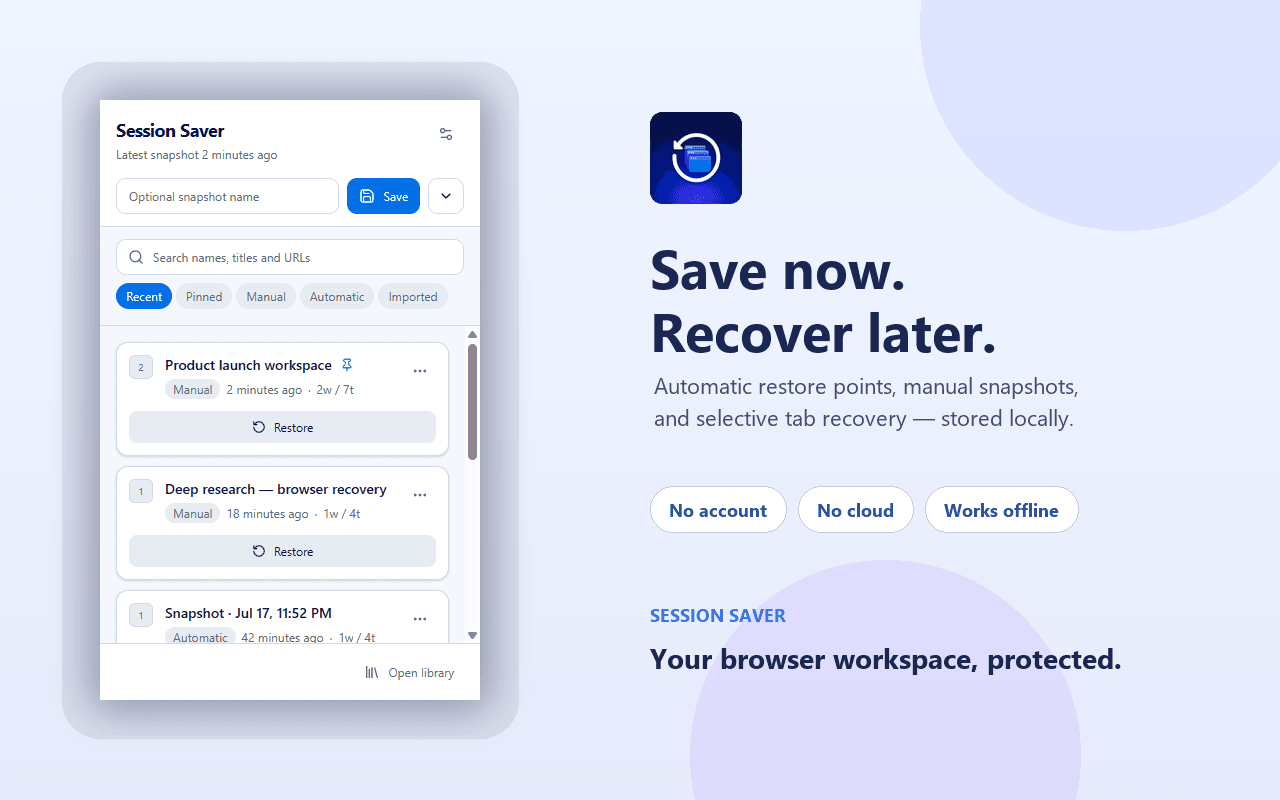
Session Saver provides automatic recovery points and deliberate named snapshots, then lets a user search, inspect and restore an entire session, one window or selected tabs. Everything remains inside the browser profile, with no account or remote service between the user and their browsing history.
Challenge
A useful snapshot must preserve more than URLs. Window boundaries, tab order, pinned and active state, and supported Chrome Tab Groups all affect how a workspace returns.
Manifest V3 service workers are suspended when idle, so automatic recovery cannot depend on a permanently running process. Local writes, retention cleanup and change-triggered captures also need to avoid racing or storing the same workspace repeatedly.
Existing version 1 data could not be replaced optimistically. A failed migration had to leave legacy keys intact, while imported files needed validation and fresh identifiers before they could enter the local repository.
Solution
The extension captures browser windows, tabs and supported groups into a validated schema. Users can create named snapshots from the popup, while alarms and browser-state changes create bounded automatic recovery points in the background.
A typed repository serializes writes to chrome.storage.local, hashes captured window state to skip duplicate recovery points and applies retention separately to automatic and change-triggered snapshots. Manual, imported and pinned sessions are kept until the user removes them.
The full library supports search, pinning, rename, export and selective restore. Import validates schema v2 or converts supported legacy collections, remaps internal identifiers and sanitizes text before persistence. The v1 migration writes and verifies schema v2 before removing old storage keys.
Responsibilities
- Define the product workflow for quick capture, automatic recovery and selective restoration.
- Rebuild the extension on WXT, React and strict TypeScript for Chrome Manifest V3.
- Design the typed local repository, serialized write path, retention rules and duplicate hashing.
- Preserve tab order, pinned state, active tabs and supported Chrome Tab Groups during restore.
- Implement validated import and export plus a defensive v1-to-v2 storage migration.
- Build the popup, session library, settings and repository, migration, retention and hashing tests.
Architecture
Interface
Popup and session library
Services
Capture and validation
MV3 service worker
Selective restore
Safe import and export
Data
Typed local repository
Recovery points and snapshots
Legacy v1 to schema v2
Automation
Browser tabs and groups
Infrastructure
Chrome Manifest V3
Windows, tabs, groups and supported state
Browser tabs and groups -> Capture and validation
Alarm and browser-change capture events
MV3 service worker -> Capture and validation
Validated and hashed session data
Capture and validation -> Typed local repository
Local recovery and named snapshot state
Typed local repository -> Recovery points and snapshots
Searchable session read model
Recovery points and snapshots -> Popup and session library
Full, window or selected-tab request
Popup and session library -> Selective restore
Recreated browser workspace
Selective restore -> Browser tabs and groups
Validated import and schema v2 export
Safe import and export -> Typed local repository
Verified legacy conversion
Legacy v1 to schema v2 -> Typed local repository
Browser-managed background lifecycle
MV3 service worker -> Chrome Manifest V3
Extension popup and full-page UI
Popup and session library -> Chrome Manifest V3
Technical decisions
Keep browsing state local
- Problem
- Session snapshots contain URLs and titles that can reveal sensitive work, research and account activity.
- Decision
- Store product data only in chrome.storage.local and avoid accounts, host permissions, analytics, remote scripts and network services.
- Reason
- The extension can solve recovery entirely inside the browser profile without creating a second privacy boundary.
- Trade-off
- There is no automatic cross-device synchronization; portability is an explicit export and import action.
Hash recovery points before writing
- Problem
- Timers and browser changes can capture the same workspace repeatedly and consume retention slots without adding recovery value.
- Decision
- Calculate a stable hash from the captured windows and skip a new automatic or change-triggered snapshot when it matches the latest recovery point.
- Reason
- Retention is spent on meaningful state changes while manual snapshots remain deliberate user actions.
- Trade-off
- Hashing adds work during capture and must stay stable when the schema evolves.
Restore at session, window or tab level
- Problem
- Opening every saved tab is disruptive when only one part of a large workspace is needed.
- Decision
- Expose full-session restore alongside per-window and selected-tab recovery while preserving supported ordering, pinned state and groups.
- Reason
- Recovery matches the scale of the loss instead of forcing an all-or-nothing action.
- Trade-off
- Selective restore adds UI state and more browser API edge cases than a single restore button.
Verify migration before deleting legacy data
- Problem
- Removing version 1 keys before the version 2 state is known to be valid could permanently lose existing sessions.
- Decision
- Validate every supported legacy entry, write schema v2, read it back through the v2 validator and only then remove the old keys.
- Reason
- Any invalid legacy entry stops migration without changing the user's original data.
- Trade-off
- Migration is intentionally conservative and refuses partial automatic conversion.
Schedule recovery with Manifest V3 alarms
- Problem
- A Manifest V3 background worker cannot remain alive just to run an in-memory interval.
- Decision
- Use Chrome alarms and persist all durable state outside the service-worker lifetime.
- Reason
- Automatic recovery resumes through browser-managed events even after the worker has been suspended.
- Trade-off
- Alarm delivery is browser-managed and should be treated as periodic rather than exact real-time scheduling.
Media
Gallery
Outcomes
- The shipped extension provides quick saves, named sessions, automatic recovery points and granular restore through one local-first workflow.
- Retention and hash-based duplicate handling keep background snapshots bounded without automatically deleting manual, imported or pinned sessions.
- The current v2 codebase has a verified migration path from the legacy storage model and remains usable without an account or network service.
Verified highlights
- The Chrome Web Store listing and public source repository are available as separate project actions.
- The current source manifest identifies version 2.0.0 and uses the tabs, storage, alarms, notifications and tabGroups permissions.
- The public Store channel currently lists version 1.7; this project page documents the newer v2 codebase in the linked repository.
- No host permissions, remote scripts, analytics, accounts or network services are configured in the v2 source.
- The repository validates storage and imports with Zod and serializes local repository writes.
- Automated tests cover repository behavior, migration, retention and session hashing.
Learnings
- For recovery software, a snapshot is valuable only when restoration preserves the structure users rely on, not merely a list of URLs.
- Local-first is an architectural constraint: permissions, migration, retention, portability and failure handling all need to support the privacy promise.